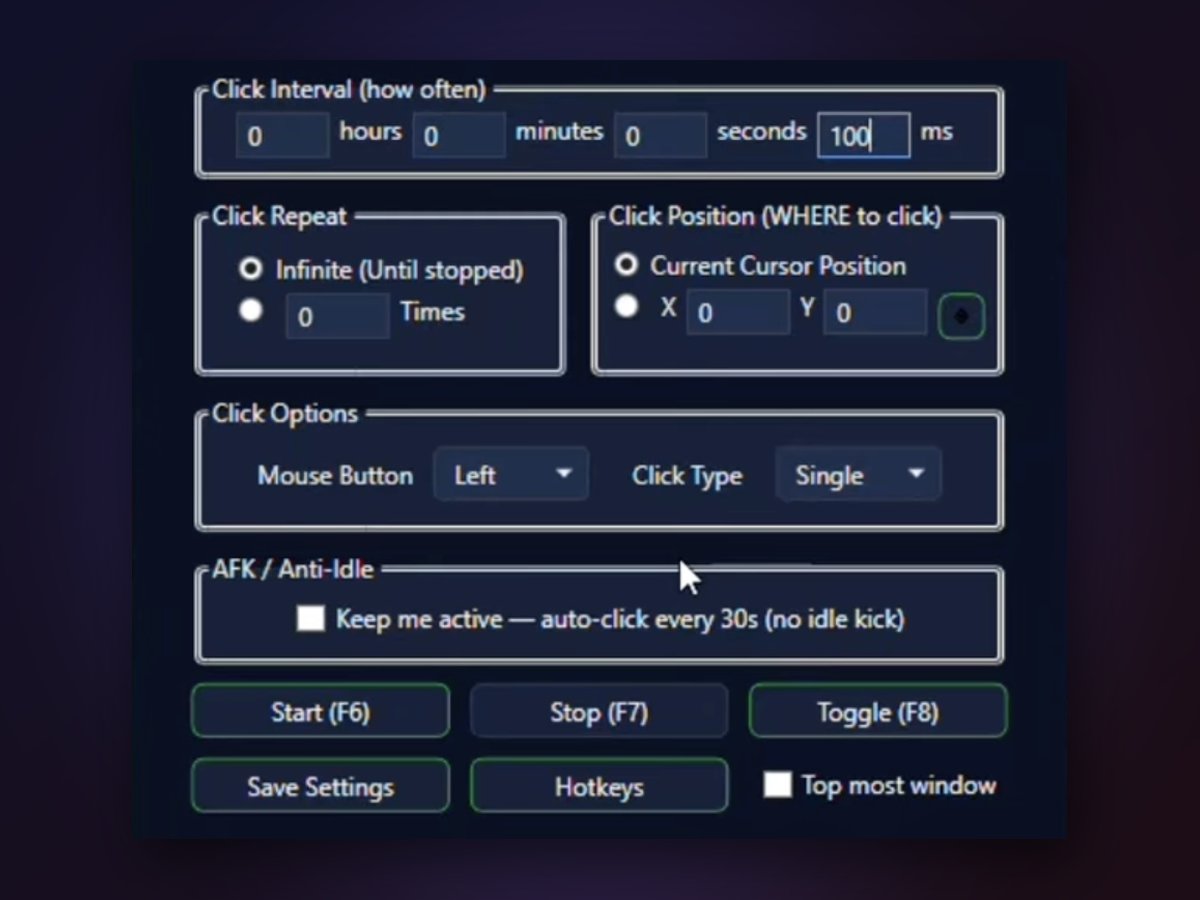
Click at exact screen coordinates or wherever your cursor is. Set the interval in milliseconds, seconds, minutes, or hours—from rapid machine-gun clicks to slow, spaced taps. Left, right, middle button, single or double click: you control every detail.
Setup takes less than a minute—no configuration files, no hidden menus.
Holding a static position means you can walk away, adjust other windows, or let the game window move—your clicks still land exactly where you set them.
Left, right, middle, single or double click—choose what your task needs. No guessing about which button the game expects. Switch on the fly.
Type in hours, minutes, seconds, or milliseconds without unit conversion headaches. 100ms for steady play, 50ms for speed runs, 5000ms for leisurely clicking.
Set a click limit so the clicker shuts down automatically, or let it loop until you press Stop. Never overshoot your target count.
Keep the window visible while you play, or minimize it to the system tray and control it with hotkeys alone. Your screen, your choice.

Once you pick your target coordinates, the clicker returns to that exact pixel every single time. No drift, no guessing—just reliable, repeatable automation. Whether you need 100 clicks or 10,000, the position stays locked in.
Yes. Press the crosshair picker button, then click the target spot on your screen. The clicker will return to those exact coordinates for every click.
1 millisecond is the practical limit. For gaming, 50–100ms works well; for speed runs, go as low as 20–50ms.
Yes. The clicker uses global hotkeys that work even when a game window is in focus, so you don't have to alt-tab to start or stop.
If you've set fixed X/Y coordinates, the clicker ignores your mouse and returns to that spot. If you're using 'Current Cursor Position', it clicks wherever your mouse is.
Yes. Leave the repeat field empty to click forever, or enter a number to stop automatically after that many clicks.
Yes. Enable the AFK / Anti-Idle mode for a gentle click every 30 seconds, keeping your session active without annoying the server.
No. The app is a single .exe file under 1MB. Download, unzip, and run—no dependencies or setup.
Browser-based clickers run in the background and can't always target exact pixels; paid software charges per license. This one is free, local, and precise.
| Auto Clicker Open | Online clicker tools | |
|---|---|---|
| X/Y coordinate targeting | Full precision picker | Usually current position only |
| Interval flexibility | Milliseconds to hours | Fixed or limited ranges |
| Cost | Free, open-source | Subscription or one-time fee |
| Installation | Single portable .exe | Browser extension or full install |
| Works offline | Yes, fully local | Requires active connection |
| Global hotkeys | F6/F7/F8 anywhere | Limited or none |
Download Auto Clicker Open now and lock in your target coordinates—no signup, no installation, no surprises.
Download for Windows